For guarding companies
Software for security guarding companies
Rosters, patrols, the occurrence book, incident reports and PSIRA permits in one app that your guards use on their own phones.
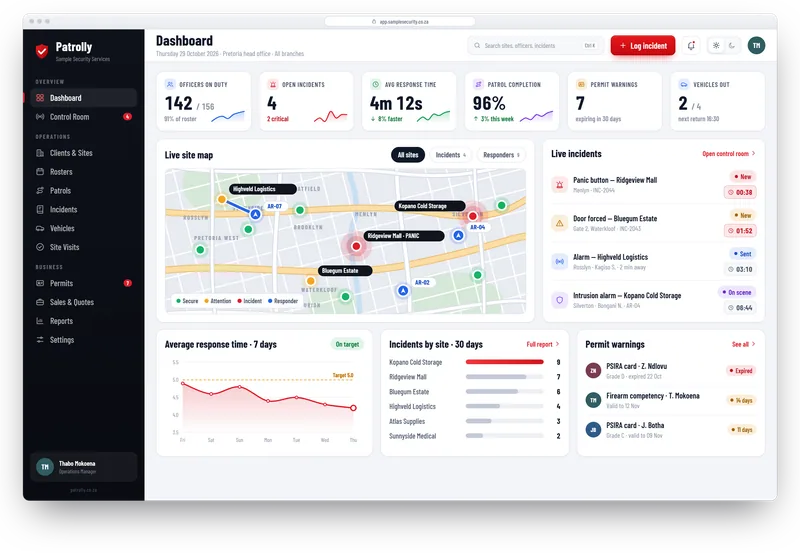
A day in your company with Patrolly
- 1
Before the shift
The roster is published and guards see their shifts. Anyone with an expired permit is blocked.
- 2
On the shift
Guards check in, scan patrol checkpoints and log visitors, vehicles and notes with photos.
- 3
When something happens
The guard reports the incident, or presses SOS. The supervisor and control room see it straight away.
- 4
After the shift
Handover notes carry over. Reports go to clients and hours are ready for payroll.
The parts guarding companies use most
Guard patrol app
QR checkpoints, live progress and missed-patrol warnings.
Learn moreDigital occurrence book
Time, place and photos on every entry.
Learn moreRosters and attendance
Build the roster on screen. Export the hours.
Learn morePSIRA permit tracker
Warnings before cards and permits expire.
Learn moreIncident reports
Reports from the phone, PDFs for clients.
Learn moreSite visits
Visit, score and follow up every site.
Learn moreQuestions
Common questions
Not here? Message us on WhatsApp and we will answer.
We only have a few guards. Is Patrolly too big for us?
Can supervisors see only their own sites?
Do our guards need smartphones?
Can our clients see what the guards did?
Want to see it with your sites?
Message us on WhatsApp. We build a free live demo with your sites, logo and guards.