Client portal
Let your clients see their own sites
Clients log in to see open incidents, patrol results and response times for their sites. They download reports, ask for a service and sign quotes online.
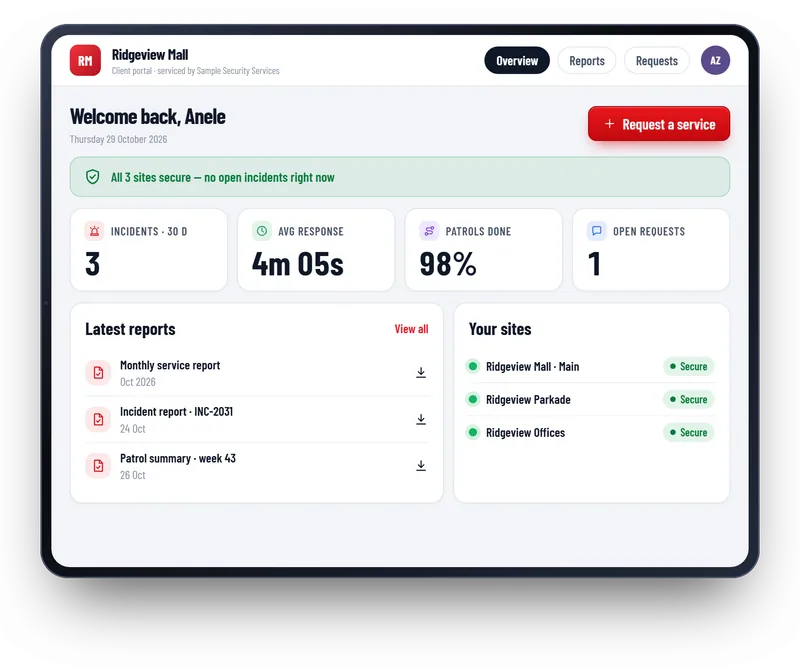
What clients get
Site status
Clients see open incidents, patrols done and response times for their own sites.
Reports
Clients download monthly and incident reports themselves.
Requests and quotes
Clients ask for a service, accept a quote and sign it online.
You control what they see
The portal shows only what you choose to share, and only for that client.
- Each client sees only their own sites
- You choose which reports they can download
- Clients are invited by email, like your staff
- Your logo and your web address
Questions
Common questions
Not here? Message us on WhatsApp and we will answer.
Do clients need to install anything?
No. They log in on a web page, on a phone, tablet or computer.
Can clients see guards’ personal details?
No. You decide what is shared. Personal details of guards stay private unless you choose to share them.
Can the portal carry our logo?
Yes. It uses your logo, your colours and your web address.
Want to see Patrolly with your own sites?
Message us on WhatsApp. We set up a free live demo with your sites, your logo and your guards.